system-architecture

ITEM Systems Architecture
Made with ❤ by ITEM Systems
Overview
Technical Architecture
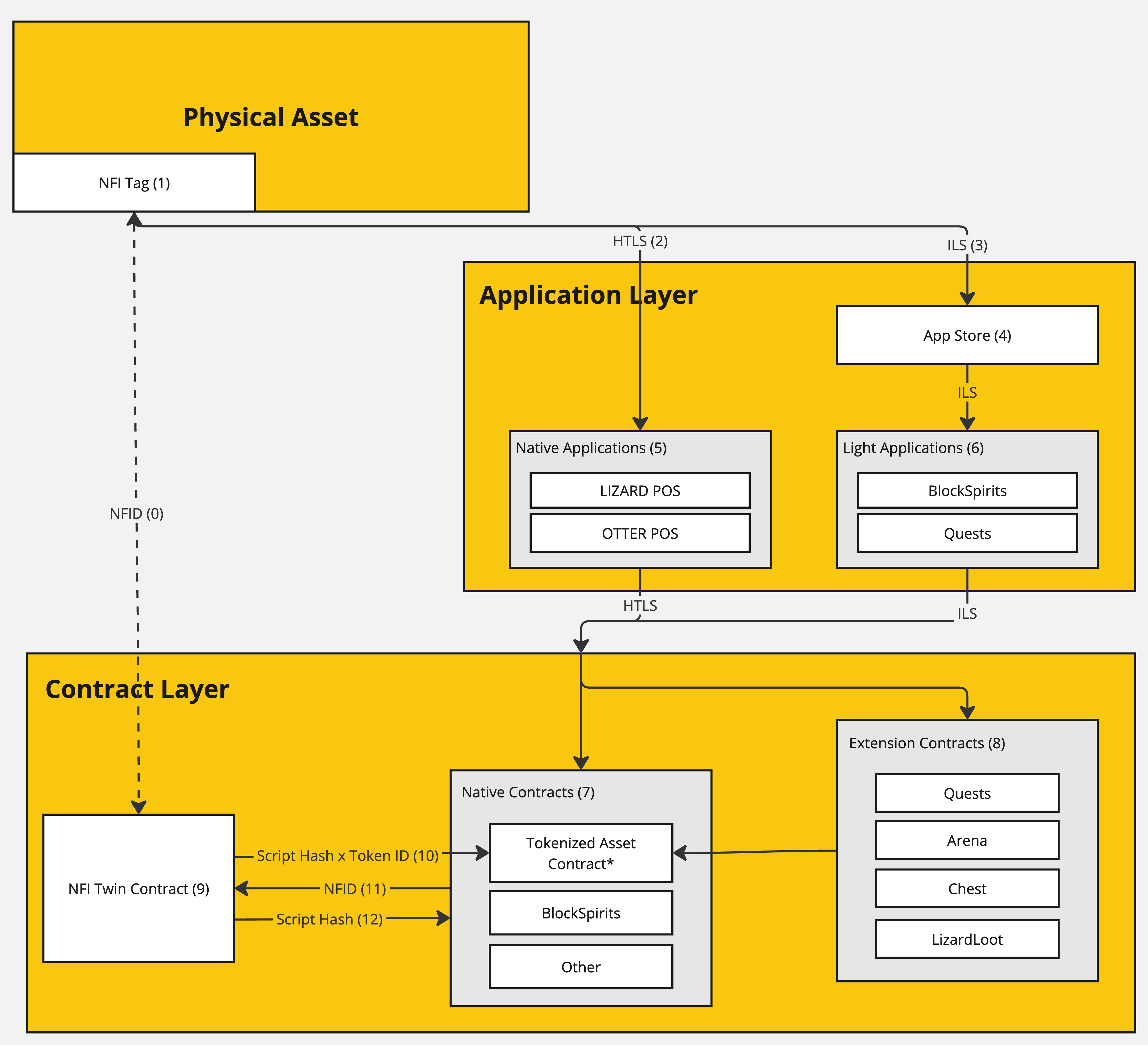
0 - NFID
A global unique identifier for a physical asset. This identifier is unique to the Physical Asset and may have multiple (historical) associations with NFI Tags (1). Only a single NFI Tag can be associated with an NFID as "active" at a time.
1 - NFI Tag
A hardware subassembly designed for embedding in a physical asset. This subassembly is configured with a secure ECDSA element for self-custodial authentication and is securely bound to an NFID using PKI.
2 - HTLS (Hash Time-Locked Signature)
The ITEM Systems architecture implements two interfaces with different value propositions. A bidirectional hash time locked interface is exposed for native applications. Native applications can provision a blockheight and hash, which is signed by the NFI Tag (1) over a bidirectional interface. This payload is passed through the application and contract layers and authorized by the NFI Twin Contract (9) for handling by the entry contract(s). It is important to burn signatures for critical transactions. This interface is more secure, but has UX implications due to time locks and software architecture restrictions. For more details on this interface, visit the dedicated design document here.
3 - ILS (Integer-Locked Signature)
The NFI Tag (1) maintains a global counter that tracks interactions. Both (2) and (3) increment this counter. This unidirectional interface presents an ECDSA signed global incrementor. This interface is exposed through the NDEF protocol and supports applications through the App Store (3). For more details on this interface, visit the dedicated design document here.
4 - App Store
The app store is used for the management of vendor and owner supported features within the ecosystem including application whitelisting, analytics, and default application configuration. It also behaves as an application router for the ILS interface.
5 - Native Applications
6 - Light Applications
7 - Native Contracts
Native applications are a class of smart contract that is authorized to interface directly with the NFI Twin contract. These contracts must be explicitly whitelisted by the Vendor with exception of the Vendor's tokenized asset contract which manages a bi-directional 1-1 binding between a token and NFID. The Vendor's tokenized asset contract is assumed to be the Default interface with the NFI Twin contract.
8 - Extension Contracts
Extension contracts interface with the NFI Twin contract through a native contract (typically the tokenized asset contract) to expose ancillary features.
9 - NFI Twin Contract
10 - Script Hash x Token ID Interface
11 - NFID Binding
12 - Script Hash Binding
Features and Permissions
| Manufacturer | Vendor | Owner | Application | User | |
|---|---|---|---|---|---|
| Create Epoch | X | - | - | - | - |
| Create Configuration | X | - | - | - | - |
| Set Configuration Property | X | - | - | - | - |
| Create NFI | X | - | - | - | - |
| Bind NFI | X | - | - | - | - |
| Lock NFI | X | - | - | - | - |
| Rebind NFI | Initiate | Approve | Inform/Approve | - | - |
| Cancel Rebind | X | X | - | - | - |
| Mint NFI | X | - | - | - | - |
| Create Application | X | - | - | - | - |
| Set Application Required Features | X | - | - | - | - |
| Set Application Authority | - | X | - | - | - |
| Set Application Active | - | - | X | - | - |
| Set NFI Lock | - | O | O | - | - |
| Set Epoch Lock | - | X | - | - | - |
| Purge Signatures | - | - | X | - | - |
| Auth | - | - | - | - | X |
Create Epoch
Creates a new vendor epoch. This is analogous to a "product configuration" and allows vendor-level configuration of NFI features.
Bind NFI
Attaches an NFI Tag to its digital twin by attaching the public key to the NFID. NFI Tag configuration (software version and hardware configuration) are also included to help with management of supported features and applications.
Rebind NFI
Executes the same behavior as "Bind NFI", but has a distinct workflow to support both vendor and user autonomy.
Mint NFI
Creates a new global unique digital twin in the NFI Twin Contract. This entry is unique across all supported protocols.
Manage Supported Applications
Maintains the list of applications within the ecosystem that are supported by specific feature sets of an NFI Tag. This is primarily handled on-chain by registering tag features.
Manage Application Whitelist
Manages the list of supported applications for a specific NFI epoch. Whitelisted native applications MUST be within the approved subset defined by the "Manage Supported Applications" workflow.
Manage Authorization Settings
Tunes a subset of the authorization features withing acceptable ranges. Examples include the authorization time period for HTLS and authorization cooldown periods.
Authorize Applications
Authorizes a native contract for used of the authorization routines on the NFI Twin contract. The authorized application MUST be a subset of the approved application list defined by the "Manage Application Whitelist" workflow managed by the vendor.
Lock Authorization
Freezes the ability to burn in the NFI Twin contract, rendering approvals unusable. This feature is particularly useful in a lost/stolen scenario. This workflow can be executed without interfacing with the physical asset.
Purge Signatures
Uses the global counter to invalidate all issued signatures over all interfaces invalid. Signatures will still be able to prove authenticity, but will be unable to successfully execute any of the secure authentication routines.
Auth
Pushes an HTLS or ILS signature into the NFI Twin contract to burn. This can be done directly with the NFI Twin contract as the entry point or proxied through a whitelisted native contract.